






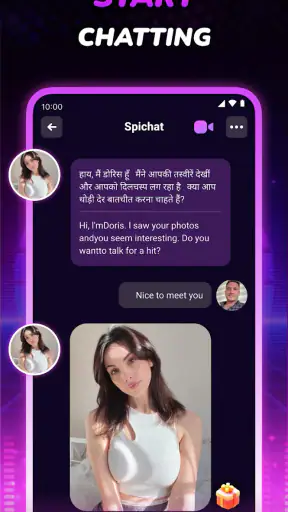
I approached Spichat - Video Chat&Call as a social app for people who would rather meet someone face to face than exchange a long chain of messages. Its central idea is simple: open a live video conversation with people from different places and use that contact to discover other cultures. In practice, the appeal depends less on having a huge collection of tools and more on whether you enjoy spontaneous conversations with strangers.
That makes it quite different from a conventional messaging app. I would not install it mainly to keep up with relatives, organize a group, or maintain a carefully selected circle of friends. I see it as a lightweight way to step outside my usual social routine. When I use it with a clear purpose and a little patience, the live format feels more personal than text chat. When I want control, privacy, or a predictable conversation, a familiar messenger is usually the better choice.
How Spichat fits into a real daily routine
The baseline workflow is easy to understand. I open the app, move into its social video-chat experience, and look for a conversation rather than building a profile-heavy social feed. The important mental adjustment is that this is not a passive scrolling app. Its value appears when I am willing to participate, speak, listen, and accept that some encounters will be more interesting than others.
A realistic use case is a quiet evening after work. Instead of opening another short-video feed, I might spend a limited amount of time meeting someone from another country and asking about everyday life there. I would keep the conversation focused on ordinary subjects—food, commuting, music, language, or local customs—because those questions create a more natural exchange than trying to force an instant friendship. The video element helps with tone and expression, but it also means I need to be more attentive than I would be in a text conversation.
This format is especially appealing to curious users, language learners, travelers planning a trip, and people who enjoy meeting strangers without first joining a large public community. It can also help someone who wants a small break from familiar social circles. The cultural angle is not just decoration: it gives a conversation a starting point when both people might otherwise struggle to know what to say.
At the same time, I would not recommend it to someone who dislikes unexpected interactions or wants every contact screened in advance. A live video service asks for more confidence than a standard chat app. If you are uncomfortable appearing on camera, a voice-first or text-first platform will probably feel less demanding. Likewise, anyone looking for a professional networking tool, a family communicator, or a structured language course should choose an app built specifically for that job.
The app is free to install, which makes trying the basic experience straightforward. It also includes optional in-app purchases ranging from small amounts to substantially larger individual purchases, so I would pay attention before confirming anything. The practical lesson is simple: begin with the free experience, understand what you actually use, and avoid treating paid options as necessary before you know whether the social format suits you.
Spichat comes from Glam Me Team and is listed for mature users aged seventeen and above. That age guidance matters because live conversations with unknown people require judgment, particularly when a conversation becomes personal or uncomfortable. I would never share an address, school details, workplace information, private contact details, or financial information with a stranger simply because the conversation feels friendly.
What I check before starting a conversation
My first habit is to decide what I want from the session. If I begin with the vague goal of “meeting anyone,” I am more likely to leave quickly after an awkward exchange. If I begin with a small objective—practicing a greeting, learning how people spend weekends somewhere else, or simply having one pleasant conversation—the experience feels more manageable.
I also choose my surroundings carefully. A bright, quiet place makes it easier for another person to see and hear me, while a busy room creates distractions and can expose more of my private life than intended. A plain background is useful for another reason: it keeps the focus on the conversation and avoids revealing family photos, documents, screens, or location clues.
Before I use any live video app, I check the phone’s general permission controls and notification behavior. I want to know when the app can access the camera or microphone and whether alerts will interrupt other parts of my day. These are device-level habits rather than special Spichat features, but they make a meaningful difference. I prefer to grant access only when I am ready to use the core function and to silence interruptions when I need concentration elsewhere.
There is also a social setting worth deciding in advance: how long I am willing to stay in a conversation that is clearly not working. I find that a short, polite exit is better than trying to rescue every interaction. A simple goodbye protects my time and prevents the app from becoming tiring. Experienced use is not about accepting every possible contact; it is about recognizing quickly which conversations deserve attention.
Settings and habits that reduce friction
The most useful “setting” is often a personal boundary. I keep my real-world identity separate from the conversation until trust has developed over time. I avoid moving immediately to another service, especially if someone asks for personal contact information, money, or unusual favors. A live video connection can create a false sense of familiarity because facial expressions feel intimate, but a few minutes on camera do not establish trust.
I also treat the camera as an intentional tool rather than something that should remain active automatically. If I need to adjust my surroundings, check a note, or pause to think, I prefer to end or interrupt the interaction instead of allowing a stranger to watch a private moment. This small habit gives me more control and makes the experience feel less intrusive.
For users on older phones, the minimum supported Android release is version seven or later, so compatibility is relatively broad. Even when a device meets that requirement, I would still close demanding apps before a video session and make sure the phone has enough battery. Live camera use is more sensitive to a crowded device than ordinary text messaging, and a smooth conversation is easier when the phone is not struggling in the background.
I recommend keeping a few conversation prompts ready. This is not about turning a friendly chat into an interview; it is about avoiding the blank pause that often appears when two strangers connect. I might ask what a normal breakfast looks like, which public holiday matters most locally, or what a visitor commonly misunderstands about the person’s home. These questions are specific enough to invite a story but open enough to let the other person choose what to share.
Another good practice is to notice the difference between curiosity and pressure. Asking about culture can be enjoyable, but repeatedly demanding personal details can make the other person uncomfortable. I try to offer something about my own experience as well, so the exchange feels mutual. That balance is one of the clearest differences between a meaningful conversation and a sequence of shallow questions.
Faster patterns for repeat users
Once I know I enjoy the format, I use repeatable routines instead of opening the app aimlessly. One routine is a short “one conversation” session: I start with a clear time window, focus on one respectful exchange, and leave when that conversation ends. This works well on a lunch break or during a short evening pause because it prevents the app from taking over the whole night.
A second routine is topic-based. On one day I might focus on food and daily routines; on another, I might ask about music, local transport, or language expressions. A theme gives both people an easy path into the conversation and makes cultural differences more visible. It also helps me judge whether I am actually learning something rather than merely passing time on camera.
For someone practicing a language, I would keep the goal modest. Instead of trying to hold a complicated discussion, I might prepare a few phrases, ask the other person to correct one expression, and repeat it naturally during the conversation. The video format adds useful context because gestures, pronunciation, and facial reactions are visible. However, it should not be confused with formal teaching. If I need a structured curriculum, progress tracking, or carefully matched lessons, a dedicated language-learning service is more suitable.
I find it helpful to end conversations with a brief reflection. I ask myself whether the person was respectful, whether the topic felt balanced, and whether I would want a similar interaction again. This creates a simple filter for future use. It also stops one awkward conversation from defining my opinion of the entire app.
Another efficient pattern is to use the app when I have the right energy, not merely when I am bored. Video conversations require attention and emotional availability. If I am tired, distracted, or already irritated, I am less likely to communicate well and more likely to judge the service unfairly. Choosing the right moment is a surprisingly effective improvement because the app depends heavily on the quality of the people and the mood of the exchange.
The store short description is simply “Spichat,” while the broader positioning presents it as a global face-to-face video-chat experience. That contrast reflects my own impression: the name tells me very little, but the live social purpose becomes clear once I use it. I would explain it to a friend as a casual video-meeting app for cultural discovery, not as a replacement for every other social platform.
Where the experience has limits
The biggest limitation is unpredictability. A live connection can be warm, funny, educational, or immediately uninteresting. No interface can guarantee that two strangers will share a good rhythm. Users who expect every session to feel rewarding may become frustrated, while users who accept a little randomness are more likely to enjoy the stronger encounters.
Video also raises the social cost of a bad match. In text chat, I can take time before answering or leave a message unread. On camera, awkward silence is immediate and visible. That makes the app more engaging for confident users but more stressful for people who need time to think. I would start with short sessions rather than committing to long conversations from the beginning.
Privacy is another serious consideration. I would avoid using the app in a bedroom, office, classroom, or any place containing information I would not show to a stranger. I would also be cautious about screenshots, recording requests, or pressure to continue elsewhere. If a conversation crosses a boundary, ending it is the correct response; politeness should never outweigh personal safety.
The mature age classification reinforces that this is not an app I would hand to a child. Parents and guardians should treat it as a stranger-interaction service, not as a harmless general chat room. Even older teenagers need clear guidance about personal information, uncomfortable requests, and the difference between an engaging conversation and a trustworthy relationship.
Paid purchases are another point where restraint matters. A free starting point is useful, but optional spending can change how someone approaches the service. I would not buy anything simply to escape a disappointing conversation or chase a better one. First I would establish whether the free workflow already provides enough value, then decide whether a purchase solves a real inconvenience rather than an emotional impulse.
Compared with ordinary messaging apps, Spichat is more immediate and more personal, but less predictable and less convenient for maintaining existing relationships. Compared with large social networks, it puts more emphasis on direct contact and less on public posting or endless feeds. Compared with dedicated language-exchange platforms, it may feel more spontaneous, while those specialist services are usually preferable when structured practice and long-term learning are the priority.
The app has reached over a million installs and holds a 4.6 average from roughly twenty-six thousand ratings, which suggests that its central idea resonates with a substantial audience. I take that as a reason to try it, not as a guarantee that every conversation will suit me. The rating describes broad satisfaction; it cannot remove the personal trade-off between spontaneity and control.
Who will get the most from it
I think the strongest audience is someone who enjoys short, direct social encounters and is genuinely curious about people outside their usual environment. Travelers can use it to warm up before visiting a new place. Language learners can use it for informal exposure. Social users who are tired of polished profiles may appreciate the immediacy of seeing and hearing another person without a long setup.
It can also work for someone trying to become more comfortable speaking with strangers. I would treat that as gradual practice: begin with brief conversations, prepare a few neutral topics, and stop before the experience becomes overwhelming. The goal is not to perform perfectly. It is to become more relaxed, attentive, and respectful in a live exchange.
I would skip it if I need reliable moderation, a carefully controlled professional environment, or a dependable way to contact people I already know. I would also choose another category if I want a content feed that works without participation. Spichat asks something from me: time, attention, a willingness to appear on camera, and sensible boundaries.
The developer, Glam Me Team, has kept the concept focused enough that I can understand the intended use quickly. The current release is version 1.3.6, and the app was released on January 31, 2024. Those details are useful when checking compatibility and deciding whether the app fits a device, but the real decision is still experiential: do I want spontaneous face-to-face contact with people I do not already know?
My verdict after using it with intention
Spichat - Video Chat&Call is at its best when I treat it as a purposeful social window rather than an endless source of entertainment. I get more from it when I choose a suitable moment, prepare a few respectful prompts, protect my surroundings, and leave conversations that feel wrong. Those habits do not make every interaction perfect, but they turn the app from a random novelty into a more repeatable experience.
Its strongest quality is the sense of presence created by live video. A short conversation can communicate tone and personality in a way that text often cannot, and the cultural focus gives strangers a natural reason to talk. Its weakest quality is the same thing: live contact is exposed, unpredictable, and harder to control than messaging.
My recommendation is therefore conditional but positive. If you are curious, comfortable with video, and willing to use clear boundaries, the free entry point makes Spichat worth trying. Start with one short conversation, keep personal details private, and judge the app by the quality of several sessions rather than one awkward encounter. If you prefer predictable contacts, deep moderation, structured lessons, or quiet text communication, another type of social app will serve you better.
For me, the best way to use it is simple: enter with a question, listen carefully, share only what feels safe, and leave with a small insight about another person’s everyday world. That is a modest promise, but when the right conversation appears, it is exactly what makes this app memorable.


